ProjectFiles
Construction drawing management software.
The single source of truth for your drawings. Bring clarity and control to your project files, because in construction, the smallest mistake can cost millions.
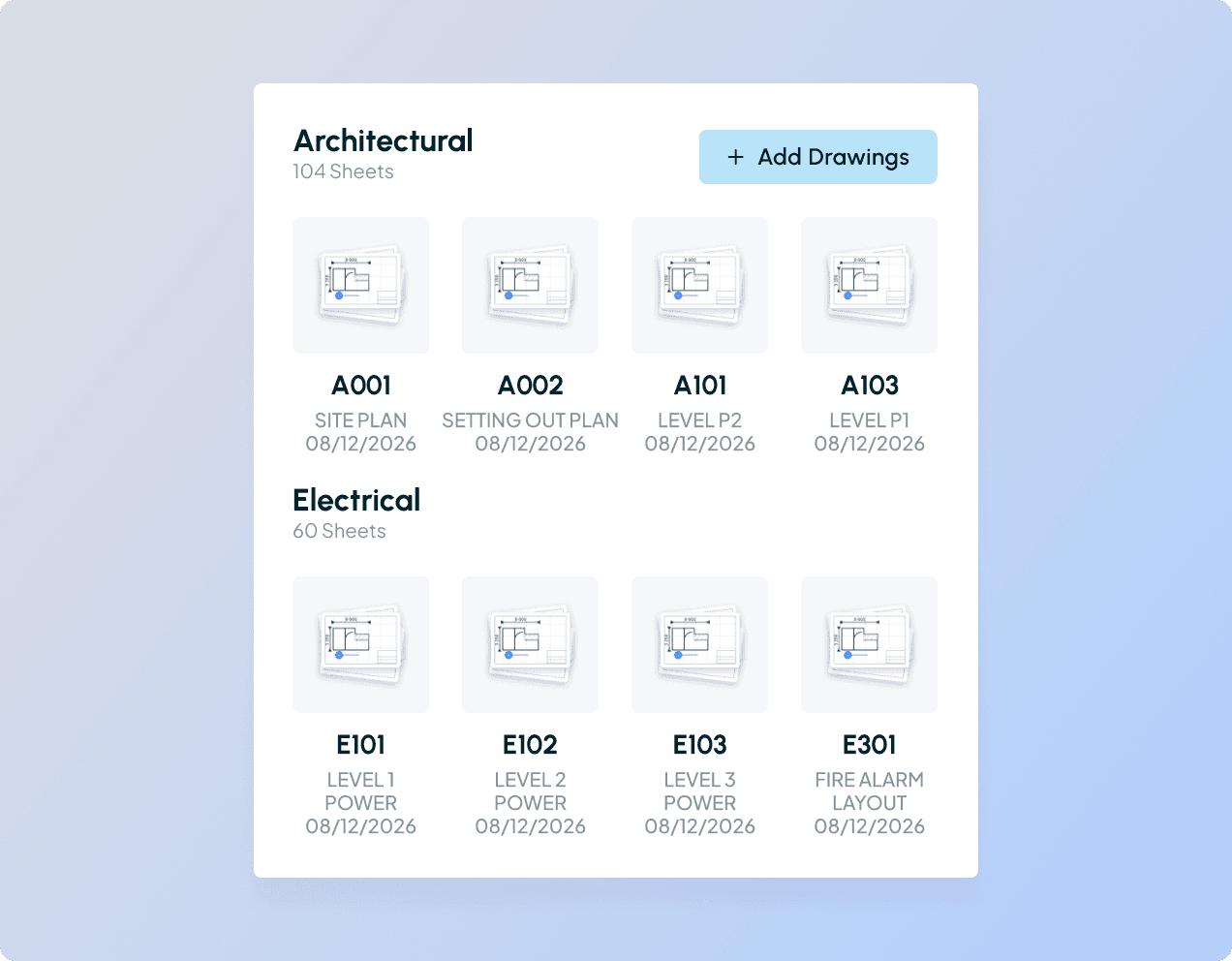
Centralized file storage
Flexible folder structures
Clear versioning & history
ProjectFiles
Construction drawing management software.
The single source of truth for your drawings. Bring clarity and control to your project files, because in construction, the smallest mistake can cost millions.
Centralized file storage
Flexible folder structures
Clear versioning & history
ProjectFiles
Construction drawing management software.
The single source of truth for your drawings. Bring clarity and control to your project files, because in construction, the smallest mistake can cost millions.
Centralized file storage
Flexible folder structures
Clear versioning & history
VERSION CONTROL
Eliminate outdated files & drawings.
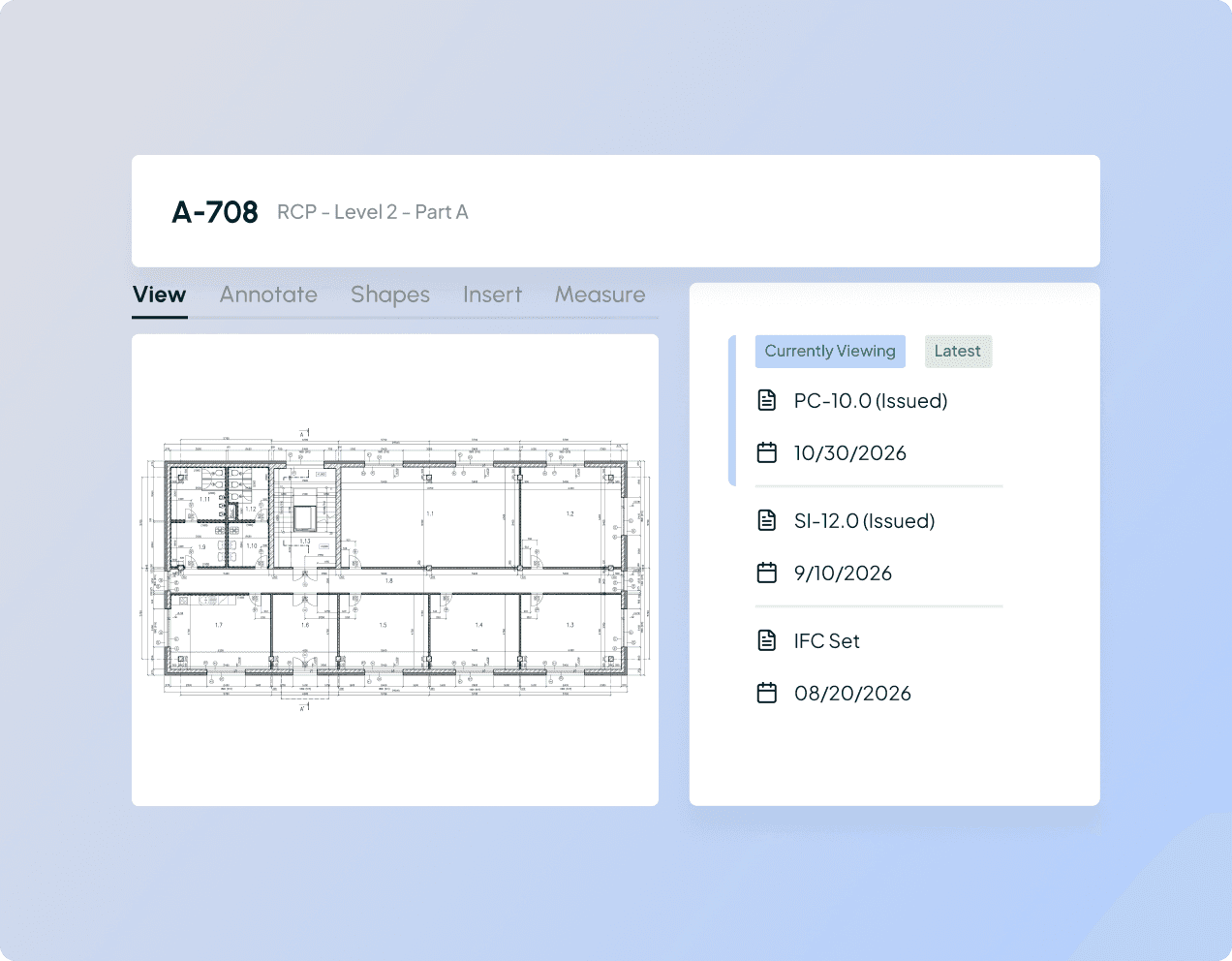
Automatic version tracking ensures your entire team is working from the most up-to-date drawings and documents (on site, and in real time). No more confusion, costly mistakes, or disputes caused by outdated information. When you're ready to share, export the full drawing set as a single PDF in one click. No compiling or manual merging required.
VERSION CONTROL
Eliminate outdated files & drawings.
Automatic version tracking ensures your entire team is working from the most up-to-date drawings and documents (on site, and in real time). No more confusion, costly mistakes, or disputes caused by outdated information. When you're ready to share, export the full drawing set as a single PDF in one click. No compiling or manual merging required.
VERSION CONTROL
Eliminate outdated files & drawings.
Automatic version tracking ensures your entire team is working from the most up-to-date drawings and documents (on site, and in real time). No more confusion, costly mistakes, or disputes caused by outdated information. When you're ready to share, export the full drawing set as a single PDF in one click. No compiling or manual merging required.
AUTOMATED DRAWING TAGS
AI-powered file accuracy.
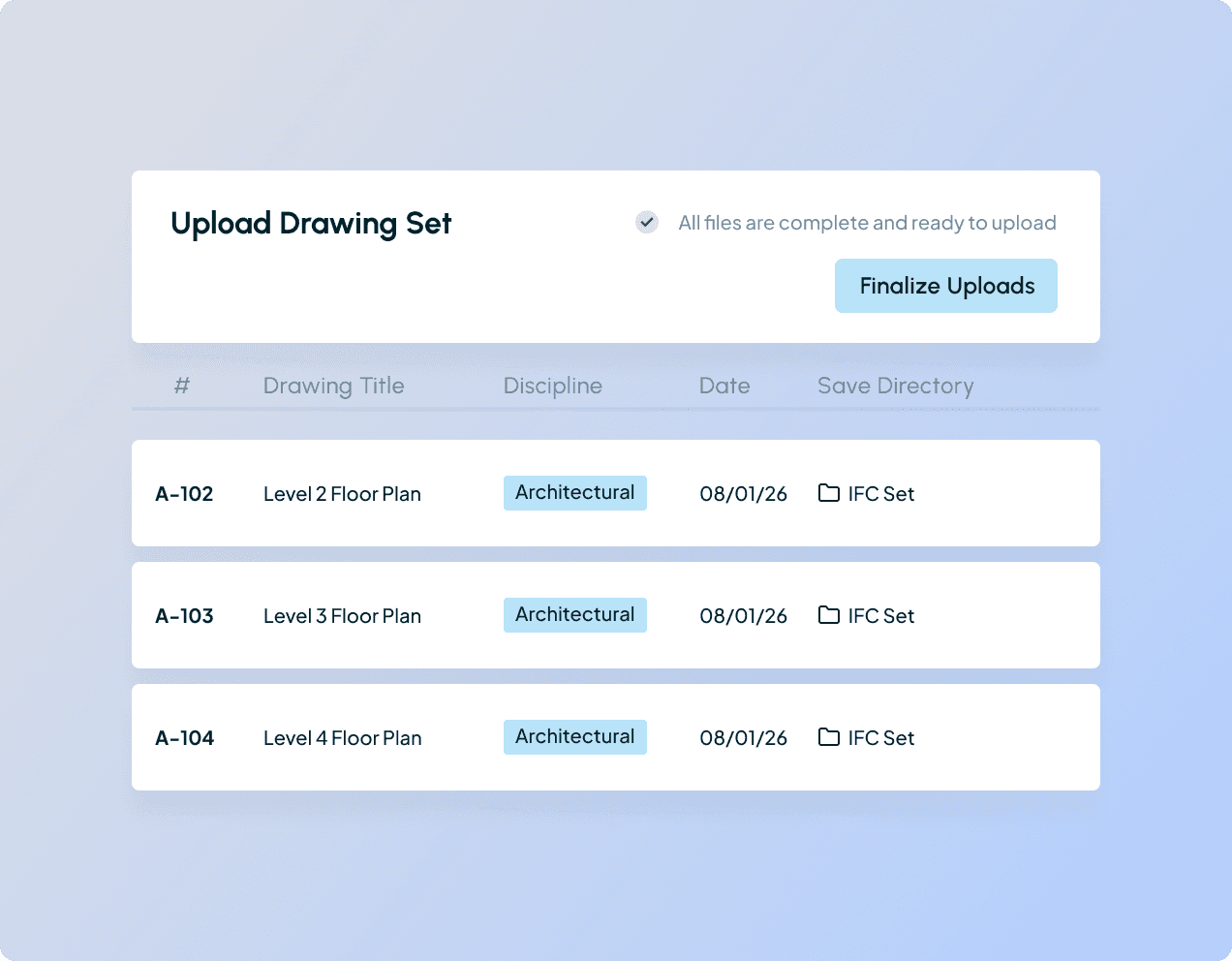
No need to juggle separate tools, simply bulk upload PDFs and images. With AI-assisted drawing detection, your files are automatically tagged with the correct drawing numbers, titles, and disciplines, so even the largest sets stay accurate and easy to manage.
AUTOMATED DRAWING TAGS
AI-powered file accuracy.
No need to juggle separate tools, simply bulk upload PDFs and images. With AI-assisted drawing detection, your files are automatically tagged with the correct drawing numbers, titles, and disciplines, so even the largest sets stay accurate and easy to manage.
AUTOMATED DRAWING TAGS
AI-powered file accuracy.
No need to juggle separate tools, simply bulk upload PDFs and images. With AI-assisted drawing detection, your files are automatically tagged with the correct drawing numbers, titles, and disciplines, so even the largest sets stay accurate and easy to manage.
ORGANIZED FILES
ORGANIZED FILES
ORGANIZED FILES
File management, simplified.
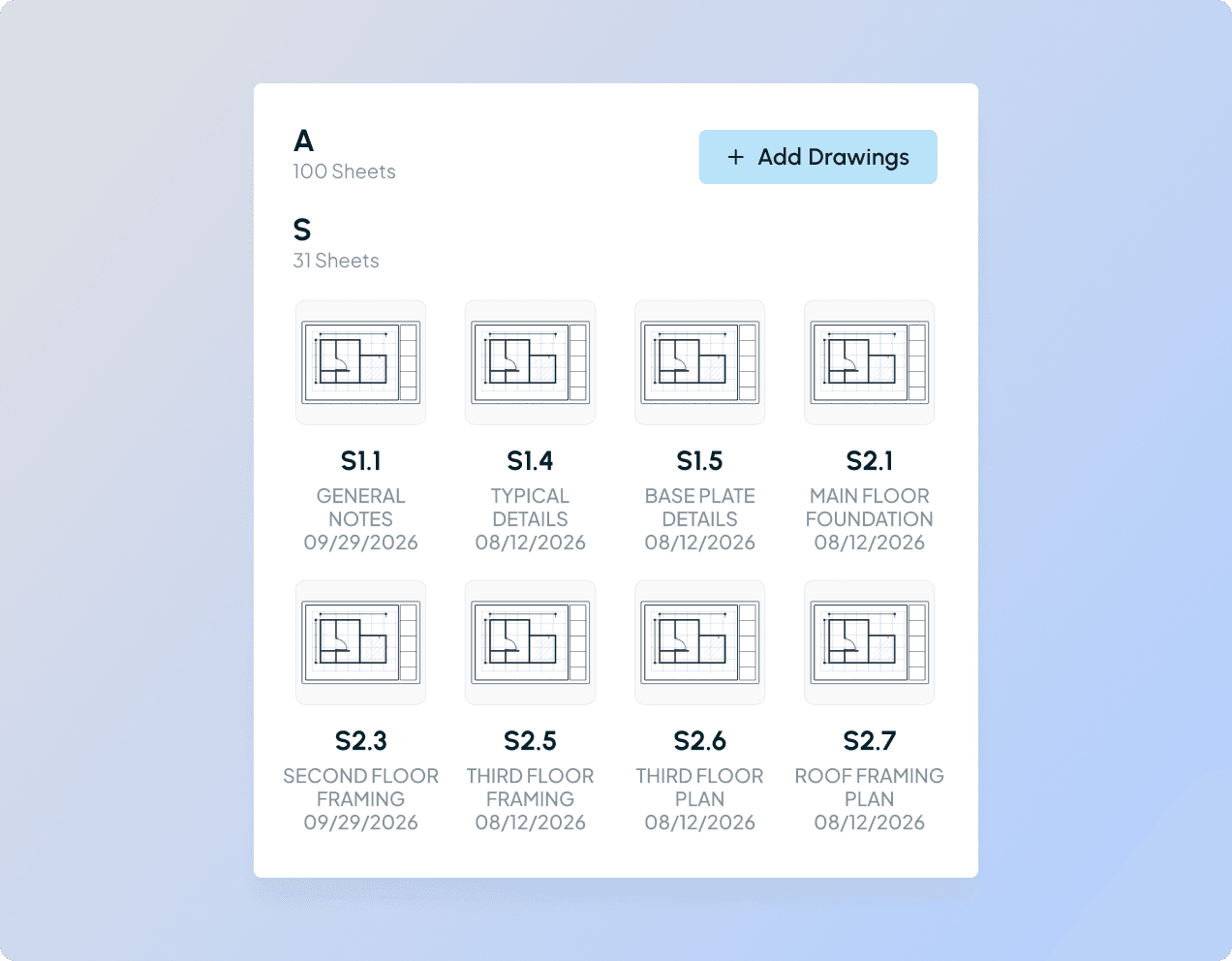
ProjectFiles gives you a simple folder system designed for the way you work. No messy workarounds or extra steps—just the structure you already know and trust.
Create, edit, and drag and drop to keep everything in place, and mark up drawings with annotations. Upload and track sketches alongside formal drawing sets, with full version control for both (all without switching tools). Group drawings into packages to organize, track, and distribute sets across your project team with ease.
ProjectFiles gives you a simple folder system designed for the way you work. No messy workarounds or extra steps—just the structure you already know and trust.
Create, edit, and drag and drop to keep everything in place, and mark up drawings with annotations. Upload and track sketches alongside formal drawing sets, with full version control for both (all without switching tools). Group drawings into packages to organize, track, and distribute sets across your project team with ease.
CENTRALIZED
All your project data, in one place.
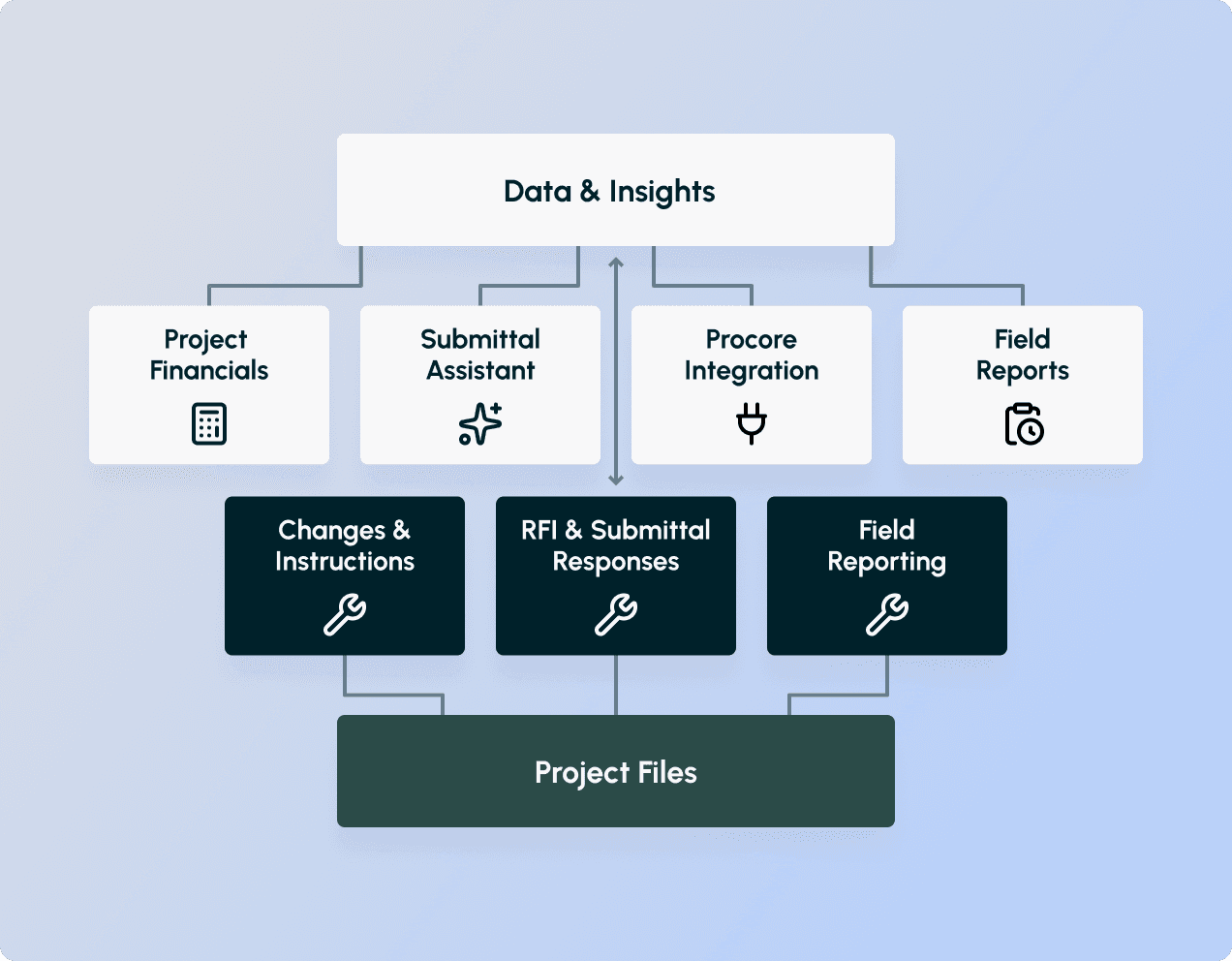
ProjectFiles isn’t just storage. It’s fully connected to your submittals, RFIs, change documents, instructions, and field reports. Upload everything from the design stage to CA and keep your entire project history organized, accessible, and in one place.
CENTRALIZED
All your project data, in one place.
ProjectFiles isn’t just storage. It’s fully connected to your submittals, RFIs, change documents, instructions, and field reports. Upload everything from the design stage to CA and keep your entire project history organized, accessible, and in one place.
CENTRALIZED
All your project data, in one place.
ProjectFiles isn’t just storage. It’s fully connected to your submittals, RFIs, change documents, instructions, and field reports. Upload everything from the design stage to CA and keep your entire project history organized, accessible, and in one place.
Testimonials
What our clients have to say.

"If you’re looking for something cost-effective to handle CA and document management—and want to get away from emails, Excel sheets, and Word docs—Part3 is where everything should live."
Quinton Scales
Construction Administration Manager
WRA Architects
1 hr
Site report delivery time

“I think it’s one of the best pieces of software available for this industry. I haven’t seen anything else that comes close.”
Rick Nelson
Contract Administrator Manager
Falcon Engineering Ltd
75%
Reduction in clerical time on CA tasks

"Just do it. Pull the trigger. Make the change. You won’t regret it. Part3 is a huge time saver—and it works!"
Eva Allen
Project & Contract Manager
KONTEXT Architects
4x
Improvement in submittal processing time

“Part3 was such a dramatic change from our old spreadsheet technology. The user-friendliness and streamlined processes have made a significant impact on our workflow.”
Curtis Norton
Executive Vice President & CTO
Strang

"Part3 doesn't disappoint. It's very intuitive and definitely something to look at. I love the tracking platform and the ability to manage everything from my phone—it saves me a ton of time and keeps me on track."
Andrew Tarpill
Associate Principal
QA+M

"Part3’s AI submittal tool is an amazing piece of software! It cuts out hours of time by identifying missing items in seconds, letting our team focus on more important tasks."
Ryan Crowle
Principal & Director of Operations
IDEA Inc.

"Unlike other platforms like Procore, where we lose copyright and control, Part3 allows us to keep everything within our system while still collaborating seamlessly with external consultants."
Philip Haderlie
Principal
VCBO
"If you’re looking for something cost-effective to handle CA and document management—and want to get away from emails, Excel sheets, and Word docs—Part3 is where everything should live."
Quinton Scales
Construction Administration Manager
WRA Architects
1 hr
Site report delivery time
“I think it’s one of the best pieces of software available for this industry. I haven’t seen anything else that comes close.”
Rick Nelson
Contract Administrator Manager
Falcon Engineering Ltd
75%
Reduction in clerical time on CA tasks
"Just do it. Pull the trigger. Make the change. You won’t regret it. Part3 is a huge time saver—and it works!"
Eva Allen
Project & Contract Manager
KONTEXT Architects
4x
Improvement in submittal processing time
“Part3 was such a dramatic change from our old spreadsheet technology. The user-friendliness and streamlined processes have made a significant impact on our workflow.”
Curtis Norton
Executive Vice President & CTO
Strang
"Part3 doesn't disappoint. It's very intuitive and definitely something to look at. I love the tracking platform and the ability to manage everything from my phone—it saves me a ton of time and keeps me on track."
Andrew Tarpill
Associate Principal
QA+M
"Part3’s AI submittal tool is an amazing piece of software! It cuts out hours of time by identifying missing items in seconds, letting our team focus on more important tasks."
Ryan Crowle
Principal & Director of Operations
IDEA Inc.
"Unlike other platforms like Procore, where we lose copyright and control, Part3 allows us to keep everything within our system while still collaborating seamlessly with external consultants."
Philip Haderlie
Principal
VCBO
"If you’re looking for something cost-effective to handle CA and document management—and want to get away from emails, Excel sheets, and Word docs—Part3 is where everything should live."
Quinton Scales
Construction Administration Manager
WRA Architects
1 hr
Site report delivery time
“I think it’s one of the best pieces of software available for this industry. I haven’t seen anything else that comes close.”
Rick Nelson
Contract Administrator Manager
Falcon Engineering Ltd
75%
Reduction in clerical time on CA tasks
"Just do it. Pull the trigger. Make the change. You won’t regret it. Part3 is a huge time saver—and it works!"
Eva Allen
Project & Contract Manager
KONTEXT Architects
4x
Improvement in submittal processing time
“Part3 was such a dramatic change from our old spreadsheet technology. The user-friendliness and streamlined processes have made a significant impact on our workflow.”
Curtis Norton
Executive Vice President & CTO
Strang
"Part3 doesn't disappoint. It's very intuitive and definitely something to look at. I love the tracking platform and the ability to manage everything from my phone—it saves me a ton of time and keeps me on track."
Andrew Tarpill
Associate Principal
QA+M
"Part3’s AI submittal tool is an amazing piece of software! It cuts out hours of time by identifying missing items in seconds, letting our team focus on more important tasks."
Ryan Crowle
Principal & Director of Operations
IDEA Inc.
"Unlike other platforms like Procore, where we lose copyright and control, Part3 allows us to keep everything within our system while still collaborating seamlessly with external consultants."
Philip Haderlie
Principal
VCBO
"If you’re looking for something cost-effective to handle CA and document management—and want to get away from emails, Excel sheets, and Word docs—Part3 is where everything should live."
Quinton Scales
Construction Administration Manager
WRA Architects
1 hr
Site report delivery time
“I think it’s one of the best pieces of software available for this industry. I haven’t seen anything else that comes close.”
Rick Nelson
Contract Administrator Manager
Falcon Engineering Ltd
75%
Reduction in clerical time on CA tasks
"Just do it. Pull the trigger. Make the change. You won’t regret it. Part3 is a huge time saver—and it works!"
Eva Allen
Project & Contract Manager
KONTEXT Architects
4x
Improvement in submittal processing time
“Part3 was such a dramatic change from our old spreadsheet technology. The user-friendliness and streamlined processes have made a significant impact on our workflow.”
Curtis Norton
Executive Vice President & CTO
Strang
"Part3 doesn't disappoint. It's very intuitive and definitely something to look at. I love the tracking platform and the ability to manage everything from my phone—it saves me a ton of time and keeps me on track."
Andrew Tarpill
Associate Principal
QA+M
"Part3’s AI submittal tool is an amazing piece of software! It cuts out hours of time by identifying missing items in seconds, letting our team focus on more important tasks."
Ryan Crowle
Principal & Director of Operations
IDEA Inc.
"Unlike other platforms like Procore, where we lose copyright and control, Part3 allows us to keep everything within our system while still collaborating seamlessly with external consultants."
Philip Haderlie
Principal
VCBO
Testimonials
What our clients have to say.
"If you’re looking for something cost-effective to handle CA and document management—and want to get away from emails, Excel sheets, and Word docs—Part3 is where everything should live."
Quinton Scales
Construction Administration Manager
WRA Architects
1 hr
Site report delivery time
“I think it’s one of the best pieces of software available for this industry. I haven’t seen anything else that comes close.”
Rick Nelson
Contract Administrator Manager
Falcon Engineering Ltd
75%
Reduction in clerical time on CA tasks
"Just do it. Pull the trigger. Make the change. You won’t regret it. Part3 is a huge time saver—and it works!"
Eva Allen
Project & Contract Manager
KONTEXT Architects
4x
Improvement in submittal processing time
“Part3 was such a dramatic change from our old spreadsheet technology. The user-friendliness and streamlined processes have made a significant impact on our workflow.”
Curtis Norton
Executive Vice President & CTO
Strang
"Before adopting Part3, our CA team was buried in paperwork and manual tasks. As we grew, we needed a more efficient system to manage RFIs, submittals, and field reports."
Andrew Tarpill
Associate Principal
QA+M
"Part3’s AI submittal tool is an amazing piece of software! It cuts out hours of time by identifying missing items in seconds, letting our team focus on more important tasks."
Ryan Crowle
Principal & Director of Operations
IDEA Inc.
"Unlike other platforms like Procore, where we lose copyright and control, Part3 allows us to keep everything within our system while still collaborating seamlessly with external consultants."
Philip Haderlie
Principal
VCBO
"If you’re looking for something cost-effective to handle CA and document management—and want to get away from emails, Excel sheets, and Word docs—Part3 is where everything should live."
Quinton Scales
Construction Administration Manager
WRA Architects
1 hr
Site report delivery time
“I think it’s one of the best pieces of software available for this industry. I haven’t seen anything else that comes close.”
Rick Nelson
Contract Administrator Manager
Falcon Engineering Ltd
75%
Reduction in clerical time on CA tasks
"Just do it. Pull the trigger. Make the change. You won’t regret it. Part3 is a huge time saver—and it works!"
Eva Allen
Project & Contract Manager
KONTEXT Architects
4x
Improvement in submittal processing time
“Part3 was such a dramatic change from our old spreadsheet technology. The user-friendliness and streamlined processes have made a significant impact on our workflow.”
Curtis Norton
Executive Vice President & CTO
Strang
"Before adopting Part3, our CA team was buried in paperwork and manual tasks. As we grew, we needed a more efficient system to manage RFIs, submittals, and field reports."
Andrew Tarpill
Associate Principal
QA+M
"Part3’s AI submittal tool is an amazing piece of software! It cuts out hours of time by identifying missing items in seconds, letting our team focus on more important tasks."
Ryan Crowle
Principal & Director of Operations
IDEA Inc.
"Unlike other platforms like Procore, where we lose copyright and control, Part3 allows us to keep everything within our system while still collaborating seamlessly with external consultants."
Philip Haderlie
Principal
VCBO
"If you’re looking for something cost-effective to handle CA and document management—and want to get away from emails, Excel sheets, and Word docs—Part3 is where everything should live."
Quinton Scales
Construction Administration Manager
WRA Architects
1 hr
Site report delivery time
“I think it’s one of the best pieces of software available for this industry. I haven’t seen anything else that comes close.”
Rick Nelson
Contract Administrator Manager
Falcon Engineering Ltd
75%
Reduction in clerical time on CA tasks
"Just do it. Pull the trigger. Make the change. You won’t regret it. Part3 is a huge time saver—and it works!"
Eva Allen
Project & Contract Manager
KONTEXT Architects
4x
Improvement in submittal processing time
“Part3 was such a dramatic change from our old spreadsheet technology. The user-friendliness and streamlined processes have made a significant impact on our workflow.”
Curtis Norton
Executive Vice President & CTO
Strang
"Before adopting Part3, our CA team was buried in paperwork and manual tasks. As we grew, we needed a more efficient system to manage RFIs, submittals, and field reports."
Andrew Tarpill
Associate Principal
QA+M
"Part3’s AI submittal tool is an amazing piece of software! It cuts out hours of time by identifying missing items in seconds, letting our team focus on more important tasks."
Ryan Crowle
Principal & Director of Operations
IDEA Inc.
"Unlike other platforms like Procore, where we lose copyright and control, Part3 allows us to keep everything within our system while still collaborating seamlessly with external consultants."
Philip Haderlie
Principal
VCBO
"If you’re looking for something cost-effective to handle CA and document management—and want to get away from emails, Excel sheets, and Word docs—Part3 is where everything should live."
Quinton Scales
Construction Administration Manager
WRA Architects
1 hr
Site report delivery time
“I think it’s one of the best pieces of software available for this industry. I haven’t seen anything else that comes close.”
Rick Nelson
Contract Administrator Manager
Falcon Engineering Ltd
75%
Reduction in clerical time on CA tasks
"Just do it. Pull the trigger. Make the change. You won’t regret it. Part3 is a huge time saver—and it works!"
Eva Allen
Project & Contract Manager
KONTEXT Architects
4x
Improvement in submittal processing time
“Part3 was such a dramatic change from our old spreadsheet technology. The user-friendliness and streamlined processes have made a significant impact on our workflow.”
Curtis Norton
Executive Vice President & CTO
Strang
"Before adopting Part3, our CA team was buried in paperwork and manual tasks. As we grew, we needed a more efficient system to manage RFIs, submittals, and field reports."
Andrew Tarpill
Associate Principal
QA+M
"Part3’s AI submittal tool is an amazing piece of software! It cuts out hours of time by identifying missing items in seconds, letting our team focus on more important tasks."
Ryan Crowle
Principal & Director of Operations
IDEA Inc.
"Unlike other platforms like Procore, where we lose copyright and control, Part3 allows us to keep everything within our system while still collaborating seamlessly with external consultants."
Philip Haderlie
Principal
VCBO
Testimonials
What our clients have to say.
"If you’re looking for something cost-effective to handle CA and document management—and want to get away from emails, Excel sheets, and Word docs—Part3 is where everything should live."
Quinton Scales
Construction Administration Manager
WRA Architects
1 hr
Site report delivery time
“I think it’s one of the best pieces of software available for this industry. I haven’t seen anything else that comes close.”
Rick Nelson
Contract Administrator Manager
Falcon Engineering Ltd
75%
Reduction in clerical time on CA tasks
"Just do it. Pull the trigger. Make the change. You won’t regret it. Part3 is a huge time saver—and it works!"
Eva Allen
Project & Contract Manager
KONTEXT Architects
4x
Improvement in submittal processing time
“Part3 was such a dramatic change from our old spreadsheet technology. The user-friendliness and streamlined processes have made a significant impact on our workflow.”
Curtis Norton
Executive Vice President & CTO
Strang
"Unlike other platforms like Procore, where we lose copyright and control, Part3 allows us to keep everything within our system while still collaborating seamlessly with external consultants."
Philip Haderlie
Principal
VCBO
"Part3’s AI submittal tool is an amazing piece of software! It cuts out hours of time by identifying missing items in seconds, letting our team focus on more important tasks."
Ryan Crowle
Principal & Director of Operations
IDEA Inc.
"Part3 doesn't disappoint. It's very intuitive and definitely something to look at. I love the tracking platform and the ability to manage everything from my phone—it saves me a ton of time and keeps me on track."
Andrew Tarpill
Associate Principal
QA+M
FAQ
Frequently asked questions.
What is ProjectFiles?
ProjectFiles is Part3's automated drawing and spec management hub where drawings and specs are automatically kept up to date with every CA document issued. Think of ProjectFiles as a live record of every design decision on your project.
Why would we manage our drawings in Part3 instead of Procore?
Does Part3 automatically split and label our drawing set?
What happens to a drawing when we issue a site instruction?
Can we view the full revision history, or just the latest version?
How do specifications work in ProjectFiles?
Can we download the latest drawings from Part3?
How much does ProjectFiles cost?
See For Yourself
Ready to modernize construction administration?
Book a personalized demo and see how architects are cutting review time, reducing risk, and gaining control with Part3.
Updates
Stay ahead of what’s changing in CA.
Get practical insights on construction administration, AI, risk reduction, and how leading firms are modernizing operations.
See For Yourself
Ready to modernize construction administration?
Book a personalized demo and see how architects are cutting review time, reducing risk, and gaining control with Part3.
Updates
Stay ahead of what’s changing in CA.
Get practical insights on construction administration, AI, risk reduction, and how leading firms are modernizing operations.
See For Yourself
Ready to modernize construction administration?
Book a personalized demo and see how architects are cutting review time, reducing risk, and gaining control with Part3.
Updates
Stay ahead of what’s changing in CA.
Get practical insights on construction administration, AI, risk reduction, and how leading firms are modernizing operations.